


SVAR React Gantt is a customizable, high-performance Gantt chart component written in React. It offers a developer-friendly API, full TypeScript support, React 19 compatibility, and flexible CSS styling.
The component supports multiple task types, dependencies, custom time scales, and light/dark themes. It is designed to handle thousands of tasks efficiently (see demo with 10k tasks).
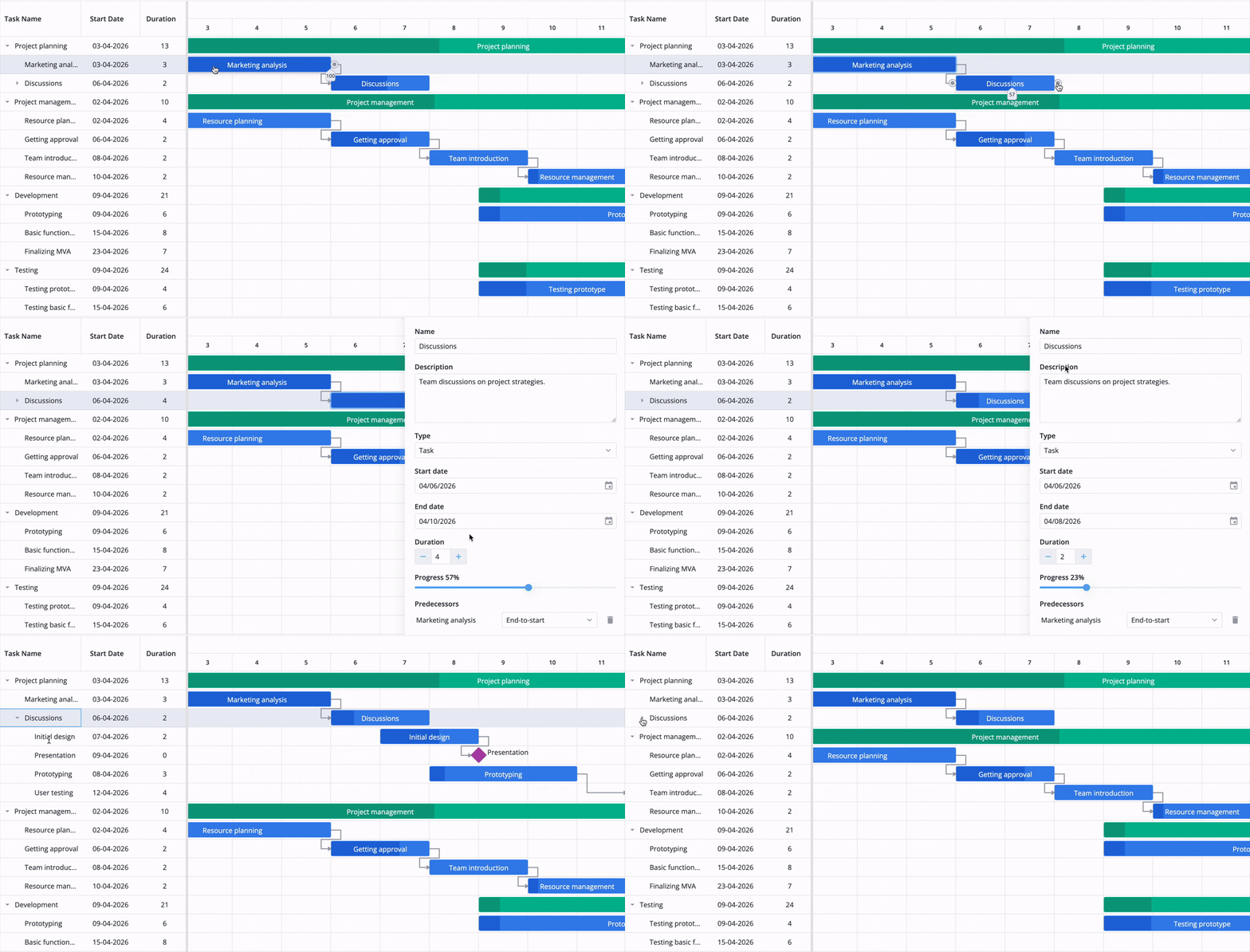
Interactive, drag-and-drop interface allows users to add, edit, and organize tasks and dependencies directly on the timeline or through a simple task edit form.
- Interactive timeline with drag-and-drop
- Customizable task edit form
- Task dependencies
- Task progress visualization
- Hierarchical view of sub tasks
- Configurable time scale (hours, days, weeks, sprints or stages)
- Flexible time units: support for hours and minutes
- Customizable grid columns
- Sorting tasks in grid
- Toolbar and context menu
- Tooltips for taskbars
- Zooming with scroll
- Hotkey support for common actions
- Fast performance with large data sets
- Localization
- Full TypeScript support
In addition to free, open-source core, SVAR React Gantt offers the PRO Edition with additional features and automation logic:
- Work days calendar (non-linear calendar)
- Auto-scheduling (forward mode and Finish-to-Start dependencies)
- Critical path
- Baselines
- Split tasks
- Vertical markers
- Undo/redo
- Summary task automation
- Export to PNG, PDF, Excel, and MS Project (export/import)
Visit the pricing page for full feature comparison and free trial.
Check out the demos to see all SVAR React Gantt features in action.
To start using SVAR React Gantt, simply import the package and include the desired component in your React file:
import { Gantt } from '@svar-ui/react-gantt';
import '@svar-ui/react-gantt/all.css';

export default function MyComponent() {
  const tasks = [
    {
      id: 20,
      text: 'New Task',
      start: new Date(2024, 5, 11),
      end: new Date(2024, 6, 12),
      duration: 1,
      progress: 2,
      type: 'task',
      lazy: false,
    },
    {
      id: 47,
      text: '[1] Master project',
      start: new Date(2024, 5, 12),
      end: new Date(2024, 7, 12),
      duration: 8,
      progress: 0,
      parent: 0,
      type: 'summary',
    },
  ];

  return <Gantt tasks={tasks} />;
}
See the getting started guide to learn how to configure data sources, customize columns, and enable editing.
If SVAR React Gantt helps your project, consider giving us a star! It helps other developers discover this library and motivates us to keep improving.
Post an Issue or use our community forum.